Governed replication for
Oracle Fusion Cloud reporting
Fusion Cloud does not give customers direct database access. Teams that need complex SQL reporting can replicate selected tables into a database they govern, then report against that copy. Historical audit work needs a separate retention step: preserve the period's data rather than expect a refreshing replica to remember it. This piece describes that reporting pattern, with AI drafting and practitioners reviewing. The worked example is QueryWell's Data Loader, the implementation we know line by line. The pattern matters more than the product, and a team that respects the same rules can build it independently.
When reporting needs a different approach
Teams can commission dedicated reports or adopt an analytics platform. Those approaches serve different needs from a small, customer-managed reporting replica.
The report factory
A dedicated BI Publisher report can be the right answer for a stable operational requirement. When analysts need to change joins or investigate new questions frequently, each change may need development, testing and deployment by the report's owner.
The analytics cloud
An enterprise analytics platform brings a managed reporting environment and a broader implementation project. That can suit a company-wide programme. A finance systems team investigating a few recurring reporting needs may instead want SQL access to a scoped copy it controls.
Oracle's own guidance is worth stating plainly, because any honest piece on this topic has to. For bulk extraction into an external warehouse, Oracle recommends BICC, and explicitly does not recommend BI Publisher as a bulk extract tool (Oracle A-Team, Data Extraction Options and Guidelines). The same guidance prefers the newer Data Extraction Tool where the required objects are supported and also warns against BI Publisher custom-SQL extraction. Bounding requests does not make this an Oracle-endorsed extraction architecture. Assess source load, permissions and support requirements with your Fusion administrators before adopting it. QueryWell's pattern is for selected reporting tables, not a replacement for bulk warehouse feeds. For the full route-by-route comparison, see how to replicate Oracle Fusion tables into your own database.
Query live for today's answer, replicate the heavy stuff
Four commitments, held together. Drop any one of them and the pattern stops being defensible.
- Ad-hoc questions, data investigation and one-off reconciliations run as live, read-only SQL through BI Publisher data models, or through your existing catalog reports, with parameters and row limits.
- The tables behind recurring, complex reporting land in your own Oracle Autonomous Database on a schedule. Joins and report iterations run on the target instead of the pod. The extraction jobs still consume pod resources and need a suitable schedule and request budget.
- QueryWell checks pod-stored policy before loading to a target and records the activity. These controls apply to cooperating QueryWell clients, so a security review must also cover source permissions and access to the target database.
- Once the data is reachable, a well-constrained AI can take the first pass at report construction. First pass, never final say.
| Situation | Live query against the pod | Against the replica |
|---|---|---|
| A one-off question about today's data | Yes, subject to report complexity and pod load | Unnecessary. The copy may be an hour old |
| Joining GL lines to subledger detail across two years | Slow, and it competes with the pod's real work | Yes, within the target database's capacity |
| Iterating on a complex report definition | Every re-run costs the pod another report execution | Yes. Prototype against the copy, deploy when stable |
| An auditor wants the March access review reproduced | Today's data cannot establish what the March review contained | Use a retained snapshot or export from March, with the original query and parameters. A refreshing replica does not preserve historical versions |
| A dashboard that must reflect this minute's transactions | Yes, if the volume is modest | No. A scheduled replica is minutes to hours behind by design |
The Always Free tier of Autonomous Database can support a small evaluation within its capacity limits. Production replicas go into an ADB you already govern, so residency and access control stay on your side of the line. See Oracle Fusion reporting with data residency.
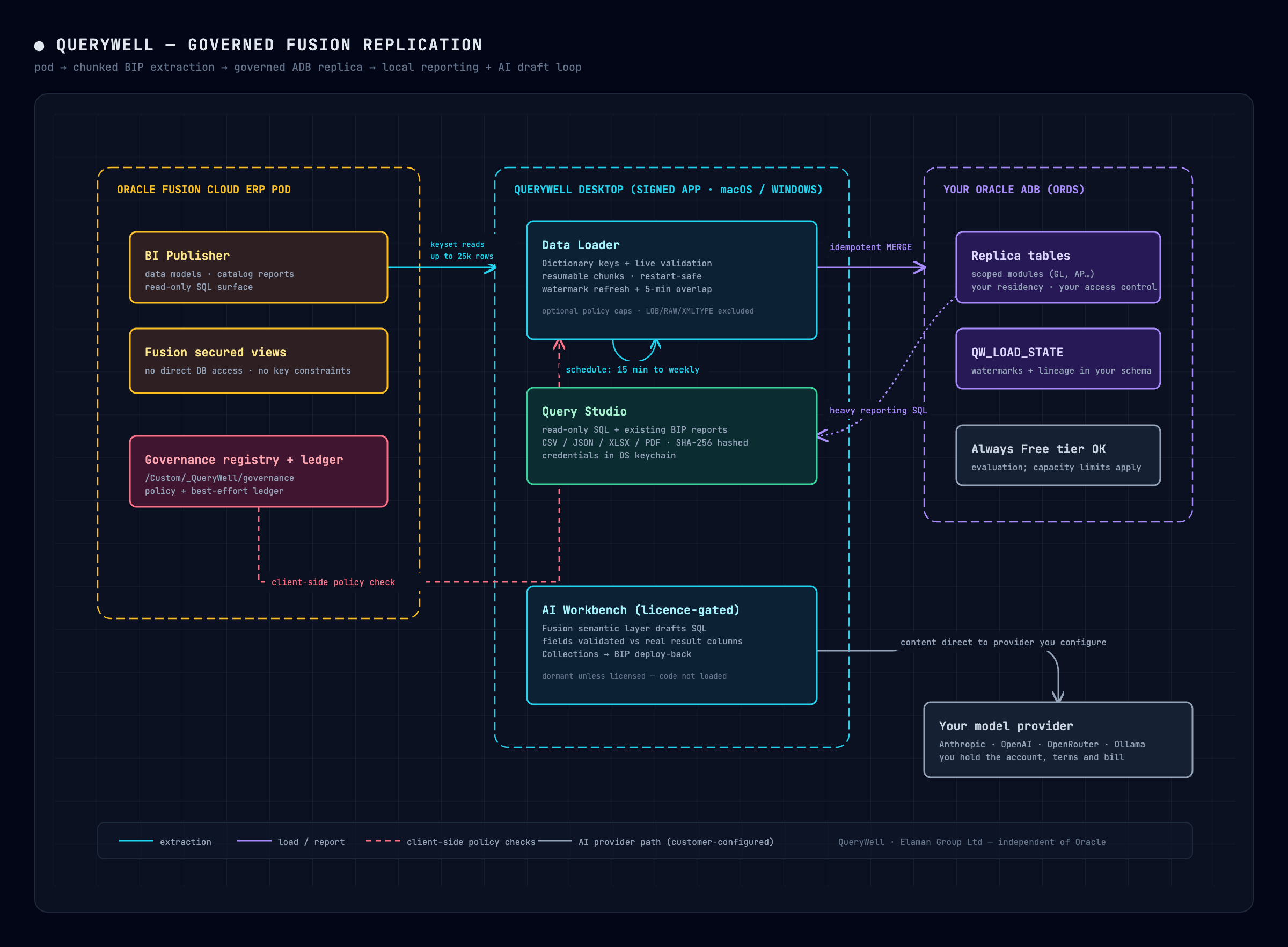
Four problems a SaaS source hands any loader
Replicating out of a SaaS ERP is not like replicating out of a database you own. This is where most homegrown scripts fall over, so this is where the detail matters.
- 1
Find keys when the views declare none
Fusion's secured views expose no key constraints, so an incremental loader has nothing to anchor
MERGEstatements to. Oracle's own Fusion application dictionary does record them: primary keys for many tables, including composite keys likeGL_JE_LINES (JE_HEADER_ID, JE_LINE_NUM)and date-tracked keys likePER_ALL_PEOPLE_F (PERSON_ID, EFFECTIVE_START_DATE, EFFECTIVE_END_DATE). Where the dictionary is silent, infer candidate keys by naming convention and validate them live against the pod before trusting them. Some views refuse ROWID paging outright, aDISTINCTorGROUP BYview raising ORA-01446, or a join view without a key-preserved table raising ORA-01445. For incremental refresh, demote those to a full re-read plusMERGE, an upsert rather than delete propagation, and say so in the log. Better a loud fallback than a silent wrong answer. - 2
Move data in chunks you can replay
Data moves in keyset-paginated chunks of about 25,000 rows through BI Publisher and lands with
MERGEstatements keyed on the validated primary key. A failed chunk re-runs harmlessly and a dead laptop mid-load resumes from the last completed chunk. The write side matters as much as the read: staging rows into a landing table and applying them in one set-based statement took a 136-column journal-lines table from 742 seconds to 22 seconds of write time on our August 2026 test pair (74,825 rows). Tables estimated at half a million rows or more load through up to four concurrent range streams, ROWID buckets for a full table and watermark sub-intervals for an incremental one, which moved 1,000,370 rows ofGL_JE_LINESin 185 seconds on our 25 August 2026 test pair. Your results will depend on the pod, table and target. - 3
Refresh on a watermark, with an overlap
Track the watermark column,
LAST_UPDATE_DATEby Fusion convention, in aQW_LOAD_STATEtable inside your own target schema. Every run re-reads a five-minute window behind the stored watermark, because source transactions commit after their timestamp says they did. Idempotent loads prevent duplicate rows during that overlap, but the extra reads and writes still cost resources. Transactions arriving outside the overlap need reconciliation. The state table survives reinstalls and records refresh watermarks; it is not a historical archive. - 4
Pace the pod and admit what you don't know
Run schedules from every 15 minutes to weekly under a single pod request budget that bounds every simultaneous report call and backs off automatically on 429 and 503 responses. ETAs come from measured pod rates, warming up per pod from a wide honest band to about a ±40% range around what this pod has actually delivered. The run header says "estimating…" before it has data and "stalled?" when progress stops, and never shows a countdown it cannot back. You can see before you commit whether a 15-minute cadence on a large table is realistic or rude.
Governance is the feature, not the afterthought
The moment you replicate ERP data anywhere, a security or audit colleague will ask what copies exist, where they live, and who made them. If the answer is a shrug, the pattern dies in review.
Policy stored in the pod itself
A registry lives in the BI Catalog under /Custom/_QueryWell/governance. Your administrators must first set the catalog folder permissions to restrict policy changes. QueryWell reads that registry to apply open or restricted target access, row caps, deny lists and a single-copy-per-table rule. Enforcement is client-side: these rules govern cooperating QueryWell clients, not other clients or direct access to the target database. They are not server-enforced data-loss prevention. Target database permissions and your organisation's retention controls govern copies after loading.
Evidence you can hand over
QueryWell records load activity in a local audit log and writes a per-user ledger to the pod on a best-effort basis. A crash or full app quit can leave the pod ledger incomplete, so reconcile it with the local records and retain the evidence you need. Export audit logs include SHA-256 hashes and execution history. For a March access review, keep the original export or a retained snapshot alongside its query, parameters and hash. A hash cannot reconstruct missing data or prove that the source population was complete. Reproducing identical file bytes also depends on stable ordering and export formatting.
Let AI draft. Never let it decide.
Text-to-SQL tools embarrass themselves on Fusion specifically: plausible SQL against the wrong tables, invented join paths, and the confident zero, where a missing field quietly renders as 0.00 and nobody notices until the numbers reach a board pack. These are the design rules that survived contact with that reality.
- Drafting runs from a Fusion-aware semantic layer rather than raw schema substring search, steered toward the real subject areas and known join paths across GL, AP, AR, cash, assets and workforce.
- Everything the model produces is visible and editable: the SQL, the parameters, the report definition. Read-only, single-statement guards run in code, not in the prompt.
- Report fields are validated against the actual result columns. A field that does not exist fails loudly at build time.
- Delivery stays inside the tool you already govern. Charts, KPI deltas and detail tables land in saved Collections, report definitions deploy back to the pod's BI Publisher catalog, and recurring runs can be armed pod-side with a completion email.
- The customer chooses and pays the model provider directly (Anthropic, OpenAI, OpenRouter, or a local Ollama endpoint), and the AI module ships dormant unless the licence activates it. The code chunk is not even loaded otherwise, so a security reviewer can inspect the licence gate and provider data path.
A practitioner still needs to review business meaning, flexfields and the result population before using an AI-drafted report.
Where the pattern stops and Oracle's own tooling takes over
The limits matter as much as the features, so here they are.
Technical limits
- Oracle ADB targets only, accessed through ORDS
- LOB, RAW and XMLTYPE columns are excluded, with a visible warning
- TIMESTAMP WITH TIME ZONE columns load as plain TIMESTAMP, so the target does not preserve the original time-zone information
- Watermark columns must be DATE or TIMESTAMP, and rows with a NULL watermark are skipped by incremental refresh
- This is not change data capture. Incremental refresh does not propagate source deletes; an optional sweep can flag missing keys for review
- There is no built-in row ceiling. A per-table cap is opt-in and defaults to unlimited, but a pod whose registry sets a maximum rows-per-load refuses an uncapped run
- A scheduled replica is minutes to hours behind the pod by design. If you need this minute's transactions, query live
Scope limits
For large-scale warehouse feeds, assess Oracle's Data Extraction Tool for supported objects and the appropriate pillar-specific extract tools, including BICC for ERP and SCM. Check object coverage and data types rather than assume any route covers every table. Enterprise semantic models and low-latency integrations are separate requirements; a scheduled reporting replica does not provide them.
The gap this pattern serves is the space between "run a report in the pod" and "stand up an analytics programme": the teams in the middle, who need heavy, repeatable, evidenced reporting and do not need a platform project to get it.
Governed replication, the questions that come up
Why not just point a desktop SQL tool at the pod?
Because there is nothing to point it at. Oracle Fusion Cloud exposes no SQL*Net or JDBC endpoint to customers, so a database client cannot connect directly. QueryWell reads through BI Publisher APIs, but API availability is not Oracle endorsement of this extraction pattern. See how authentication to that surface works.
How large a table can this pattern handle?
On our test pair, a million rows of GL_JE_LINES loaded in about three minutes across four bounded streams, and there is no built-in row ceiling. That is a measured result on our test environment, not a throughput guarantee. Source load, table width, target capacity and policy caps determine practical limits.
What happens when the pod throttles, or the machine dies mid-load?
The request budget backs off automatically on 429 and 503 responses. Chunks are idempotent, so a failed chunk re-runs harmlessly and a dead machine resumes from the last completed chunk rather than restarting a six-hour extract at hour five.
Who governs the copies once they exist?
Your administrators set policy in the pod's BI Catalog, and QueryWell applies it client-side. It does not prevent other clients from copying data. Target database permissions control access after loading. The pod ledger is best-effort, and export hashes support integrity checks only when you retain the original evidence. Details are on the Data Loader page.
Oracle guidance and measurement context
- Oracle A-Team: Data Extraction Options and Guidelines for Oracle Fusion Applications Suite, checked 29 September 2026. Covers tool selection and the limitations of BI Publisher extraction.
- Oracle Fusion Cloud Applications: Data Extraction Tool, checked 29 September 2026. Check current object coverage before selecting an extract route.
QueryWell performance figures are our own development measurements from August 2026, not Oracle benchmarks: a 74,825-row, 136-column GL_JE_LINES sample for the write-path comparison, and a 1,000,370-row sample with four streams for the 185-second load. They are examples, not service levels.
Report against your own database, retain the evidence you need
Evaluate the whole pattern on your own Fusion pod for 14 days: scope GL and AP, point the loader at an Autonomous Database, and watch the first governed tables land. A perpetual Studio licence, plus a database you already govern. See pricing.