Run reporting joins on your own copy
Load selected, accessible Fusion tables into Oracle Autonomous Database. Use supported columns in reporting, analysis and reconciliation alongside data from your other systems.
QueryWell Studio · macOS and Windows
QueryWell Studio copies selected Fusion tables into your own Oracle Autonomous Database and refreshes eligible tables incrementally on a schedule. It also gives your team a desktop workbench for Fusion SQL, reporting and verifiable exports.
Looking for SQL reporting or audit evidence? Both are included in Studio.
Data Loader is included in Studio: £1,200 per named operator, paid once, including 12 months of updates. Optional annual support and updates: £240. Database costs and applicable taxes are separate.
Schedules run from your Windows or macOS computer while QueryWell is open, including in the system tray or menu bar.
For Fusion applications owners, finance systems leads and data teams building reporting datasets in Oracle Autonomous Database. Start with the tables you need, agree the refresh cadence and keep the replica on infrastructure your team operates.
Load selected, accessible Fusion tables into Oracle Autonomous Database. Use supported columns in reporting, analysis and reconciliation alongside data from your other systems.
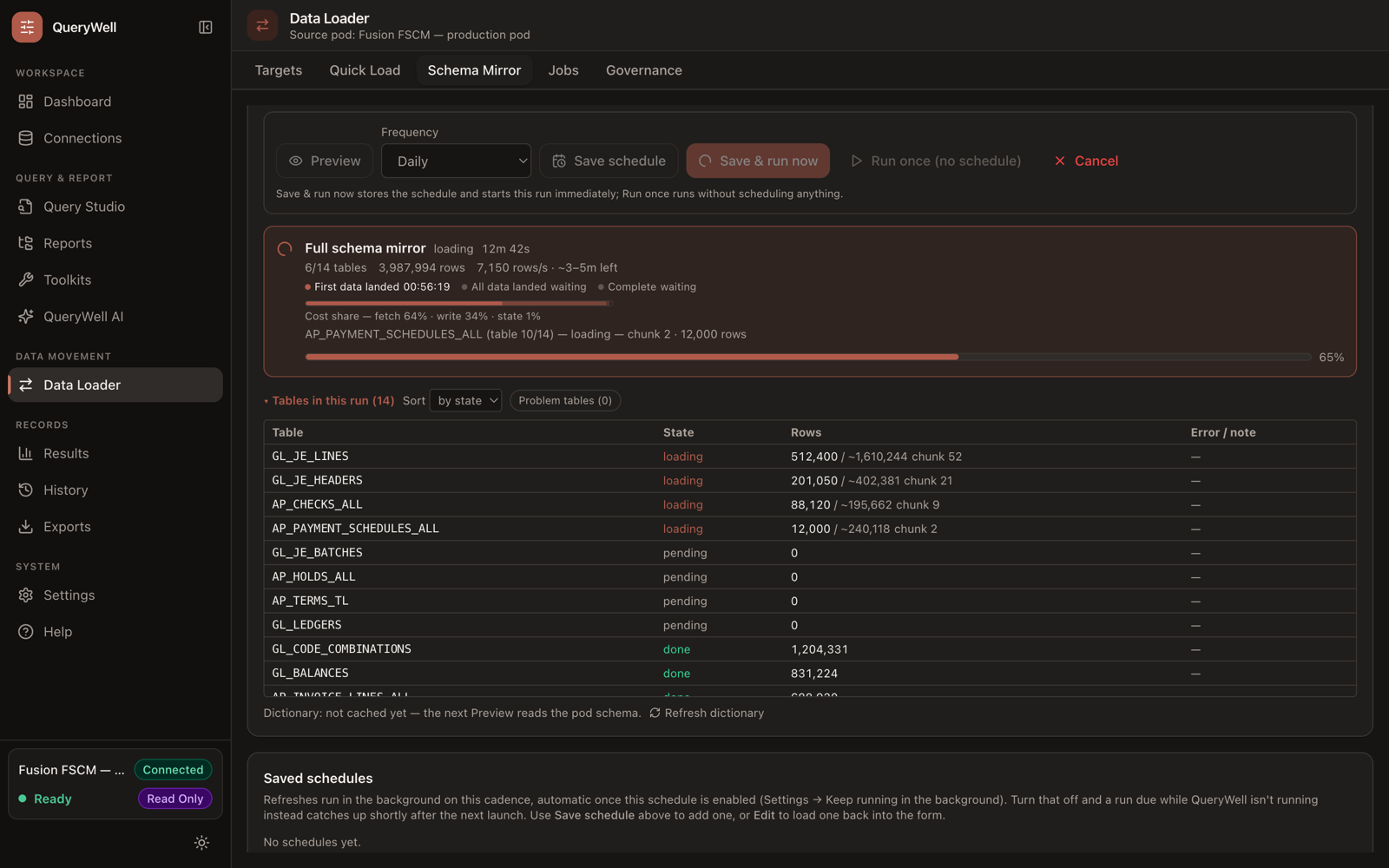
Data Loader plans initial or incremental loads according to each table’s keys and watermark. Schedules run while QueryWell is open; keep its host available for scheduled work.
Follow progress table by table, inspect failed or skipped work and recover interrupted loads from durable checkpoints. Full-refresh tables restart safely. Review the results against your reconciliation requirements.
Discover accessible Fusion objects and select the reporting scope your team needs.
Recreate supported columns and load them into your Oracle Autonomous Database.
Set the cadence and loading limits; eligible tables refresh incrementally.
Inspect table outcomes, reconcile your reporting dataset and recover interrupted work.
QueryWell reads through BI Publisher and writes to ADB through ORDS REST-enabled SQL. Review data coverage and deployment requirements and Oracle’s extraction guidance for your workload.
Use the same workbench for ad-hoc SQL reporting, existing BI Publisher reports and audit evidence. The 82-script toolkit gives your team a starting point for access reviews, SoD analysis and change audit.
Add a Fusion pod and keep the credential in your OS keychain — a green Test genuinely means reports run.
Write SQL with schema-aware autocomplete (IntelliSQL), auto-format and multi-tab editing, or run BI Publisher reports against live data with explicit parameters and limits.
Inspect a virtualized results grid, profile columns and chart exceptions without leaving the workbench.
Produce CSV, JSON, XLSX or PDF evidence with a recorded SHA-256 hash and execution history.
Bring the tables you need, an approximate volume and the refresh cadence your reporting team requires. We’ll review source access, ADB setup and data coverage before you evaluate the load, refresh and recovery workflow.
Discuss your replication workloadCreate and refresh selected reporting datasets in your Oracle Autonomous Database.
Fusion replicationAccess reviews, SoD analysis and change-audit evidence gathered repeatably and exported tamper-evident.
Audit reportingFree-form BI Publisher SQL with local credentials and no backend database access.
Query toolingRepeatable GL, AP and AR extracts and reconciliations without joining the template-development queue.
Finance reportingKeep report data local or mirror selected Fusion tables into an Oracle database already under your governance.
Data residencyStart with an approved query, review the result against a trusted reference, export it and return to the saved query next time.
AI-generated illustrative workflow scenes, a genuine QueryWell screen and demonstration data. This is an overview, not a continuous live recording. English captions are included in the video.
The overview follows an illustrative monthly AP invoice-register task: open a saved query, inspect sample rows, compare the result with a team reference and export a spreadsheet. The “Approved” label represents a query agreed by the team, not a demonstrated approval feature.
When the same Oracle Fusion reporting task comes around again, how much work do you repeat? QueryWell brings query execution, results review and exports into a desktop workbench for Oracle Fusion reporting.
Start with an approved query. Review the returned rows and check the result against the reference your team already trusts. Export the result for your reporting workflow, then return to the saved query when the task comes around again.
Before a live trial, confirm your reporting credentials, BI Publisher access and permission to install the desktop application.
Have one recurring Fusion reporting task? Email info@querywell.app and let's assess whether QueryWell fits.
Start with the task you want to assess; please do not email credentials or customer data. Live reporting requires a username and password (basic auth over HTTPS) — OAuth sign-in doesn't run reports yet, and SSO-only users can't trial QueryWell. Your reporting account needs BI Publisher access (BI Consumer or BI Author roles). Review the full trial prerequisites.
A silent recording of the app in demonstration mode: Query Studio results and charts, a sample export and Data Loader setup. Sample rows and figures are illustrative, not customer results or endorsements.
QueryWell is an independent product from Elaman Group Ltd, built and production-tested by Oracle EBS and Fusion practitioners with audit, reporting and enterprise-transformation backgrounds.
It is not affiliated with, endorsed by or sponsored by Oracle.
Test selected Fusion tables in your own Oracle Autonomous Database with a free 14-day evaluation. Data Loader is included in Studio and requires no AI provider account.