Mirror Oracle Fusion into
a database you own
When a report isn't enough, QueryWell's Data Loader replicates Oracle Fusion Cloud ERP tables into your own Oracle Autonomous Database — and keeps them fresh on a schedule. Your warehouse, your access control, your residency. No vendor analytics cloud in the middle. On our test environment, a million-row table lands in about 3 minutes — unattended, resumable, and inside a pod request budget you control.
What the Data Loader does that a SQL export never will
A query tool hands you a grid and wishes you luck. The Data Loader builds and maintains a governed replica — engineered for a SaaS source that exposes no direct database access and no key constraints.
Resumable chunked loads
Data moves in keyset-paginated chunks through BI Publisher into your target. A MERGE-idempotent design means a failed chunk is safe to re-run, and durable runs survive an app restart.
Incremental refresh
After the first load, refresh on a watermark (LAST_UPDATE_DATE) with an overlap window so late-committing transactions aren't missed.
Real Fusion keys
Fusion's secured views declare no key constraints — but Fusion's own application dictionary does. QueryWell reads the primary keys Fusion records for its tables, straight from your pod, and only falls back to a full reload when a table genuinely has none.
Scheduled & unattended
Schedule mirrors from every 15 minutes to weekly, with ETA estimates from measured pod rates. There's no run-time ceiling — close the window and QueryWell stays in your menu bar or tray, so a schedule finishes unattended and resumes from the last completed chunk after a restart. A desktop notification tells you when a run completes — and the scheduler pauses, rather than retries, if your pod credentials stop working.
Scope to what you need
Include-pattern scoping mirrors specific modules — GL and AP only, not the whole pod. A pod request budget bounds every simultaneous report request QueryWell holds open against your pod, across every table and run. Capacity presets — Conservative, Balanced, High-throughput — choose how hard a run pushes without touching the policy maths. We go faster per call, not louder on your pod.
Watch it land, table by table
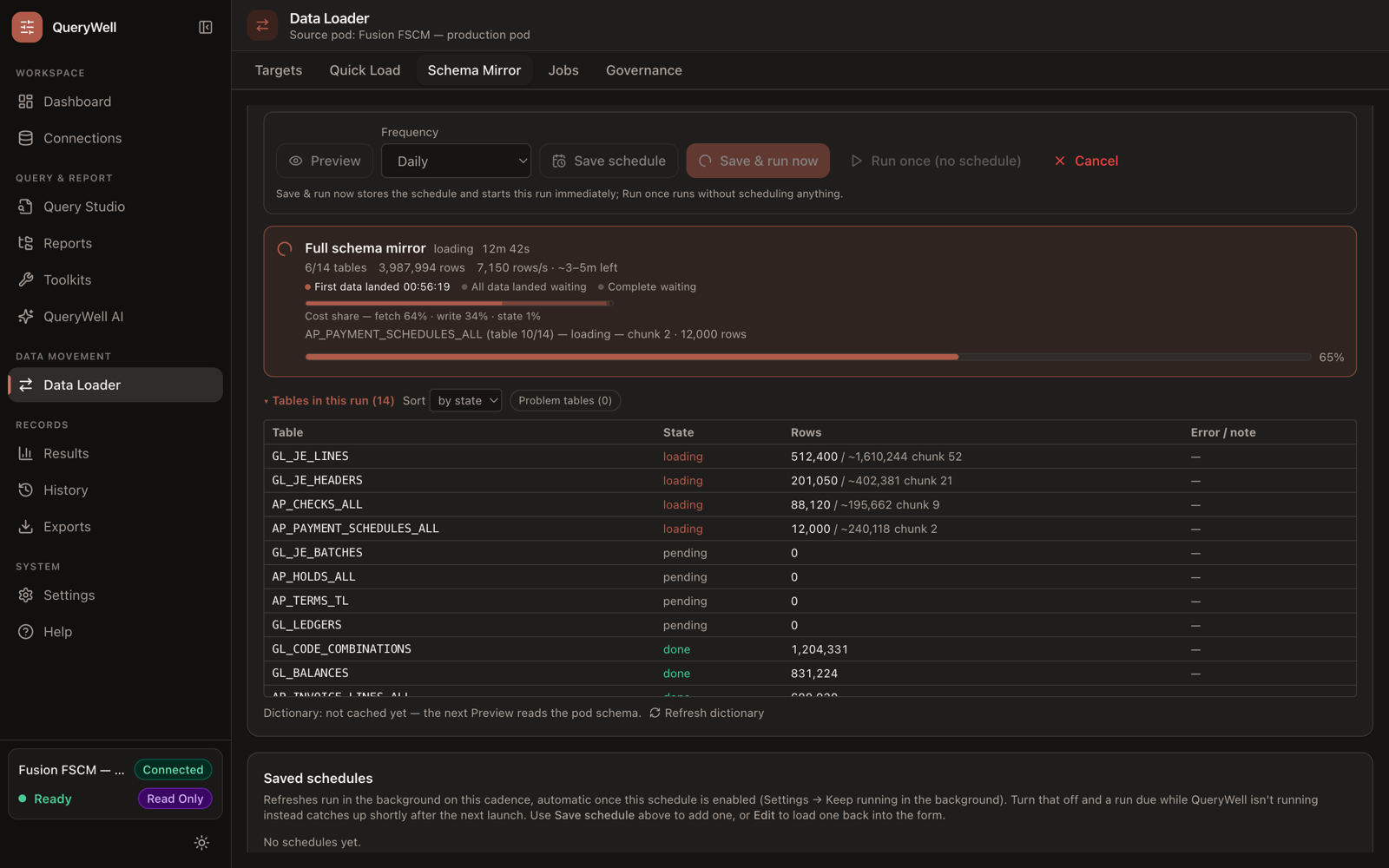
A live header tracks elapsed time and an ETA range — never a false-precision single number. A per-table list shows exactly what's queued, loading, done, failed or skipped, and a local run timeline replays what happened in plain English, no log file required. Skip a table mid-run without stopping the others, and re-run any historical mirror with one click.
Governed by policy
A registry stored in your own BI Catalog controls what may be written; every load is recorded in an exportable audit ledger with per-user folders.
The economics your FP&A team will ask about
A scheduled QueryWell mirror runs on a perpetual Studio licence plus a database you already govern — Oracle's Always Free Autonomous tier works for evaluation and modest replicas. There is no per-user-per-month analytics cloud between your team and its own reporting data, and no report-development queue billed by the day. Complex, recurring reporting moves onto infrastructure you already control.
From pod to replica in four moves
- 1
Pick a target
Point the Data Loader at your Oracle Autonomous Database (ORDS REST-enabled SQL).
- 2
Scope & enumerate
QueryWell discovers tables and views — including secured views — and you scope to the modules you want. A batch wizard adds whole modules at once, with instant size estimates wherever the pod publishes row counts.
- 3
Load
Schema is recreated target-side, then data lands in resumable chunks, keyed for idempotent MERGE.
- 4
Refresh & govern
Schedule incremental refreshes; every write is checked against policy and written to the audit ledger.
Governance controls
- Open or restricted modes — allow all targets, or only approved ones
- Per-table row caps and per-table deny lists
- Single-copy-per-table enforcement to prevent duplicates across targets
- Pod-stored audit ledger of every load, with per-user folders
- Local CSV export of the ledger for offline audit
Good to know
- Oracle Autonomous Database targets today (ORDS REST-enabled SQL)
- MERGE-based loading; unlimited rows per table by default (0 = unlimited) — an optional per-run cap is available, and your admin's governance limits still apply
- LOB / RAW / CLOB / BLOB / XMLTYPE columns excluded, with warnings
- Watermark column must be DATE or TIMESTAMP (no time zone)
- Optional delete-sweep detects rows removed at source; deletes are never propagated automatically
- A million-row table loads in about 3 minutes on our test environment — four bounded streams, still inside your pod budget
- Weighing the alternatives? Read how to replicate Oracle Fusion tables into your own database — the five routes compared against Oracle's own guidance
- The operating model behind it: governed replication for Oracle Fusion reporting — the practitioner pattern, with measured figures and honest limits
Keep the copy on your side of the line
Land Fusion data in a database you already own and govern — then run your BI on it, without shipping your ERP data to someone else's cloud.